Free Mac Menu-Bar Watts: See Live Power Draw
macOS never shows you how many watts your Mac is actually pulling. Activity Monitor's "Energy Impact" is a relative score, not a wattage. LiveMetrics adds a live watts chip to your menu bar — reading real per-domain SoC power on Apple Silicon — free, native, and ~1.4 MB, with no Terminal, sudo, or kernel extension.
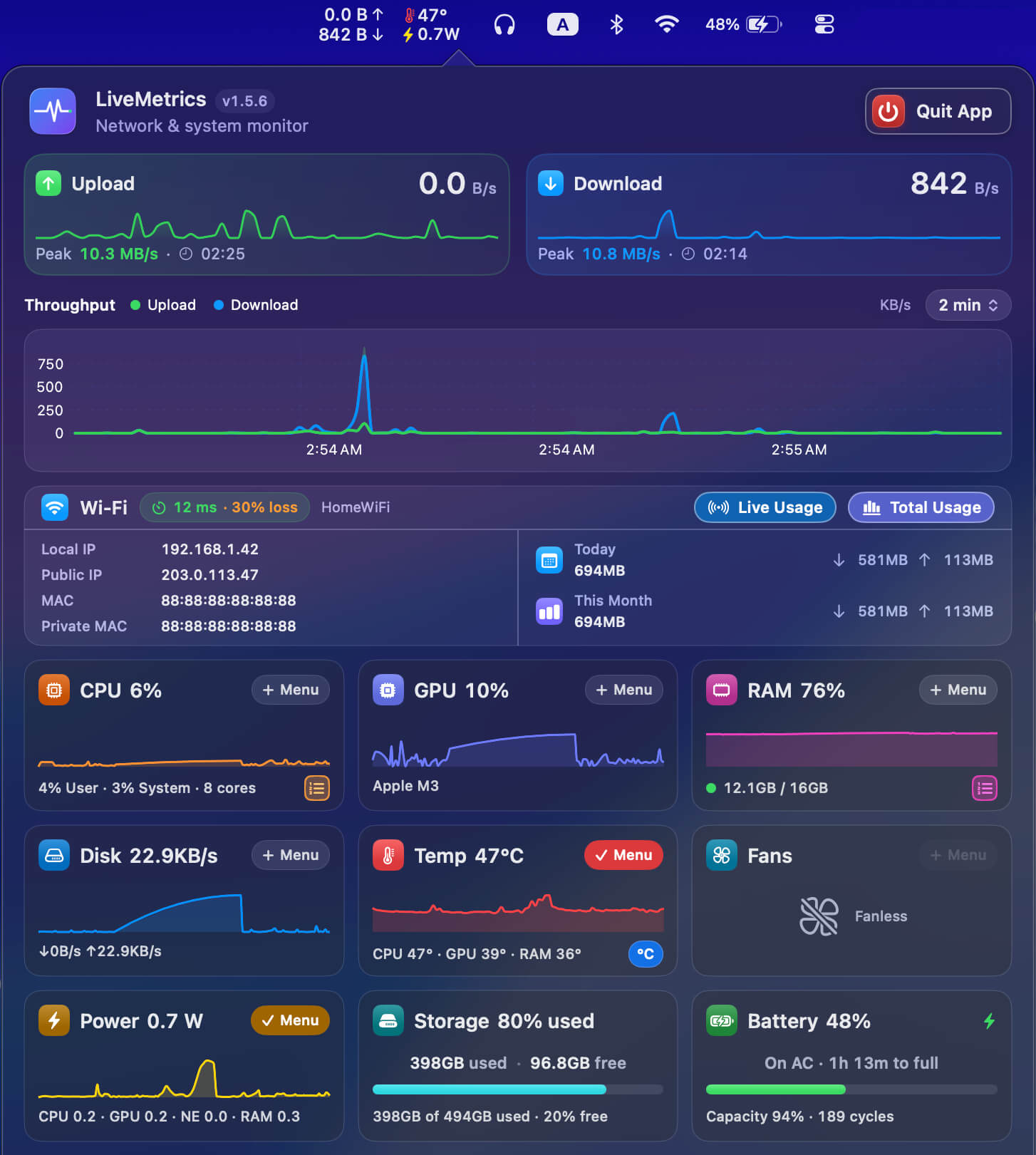
macOS has no built-in live watts readout
There is no native macOS feature that shows the live wattage your Mac is consuming. Activity Monitor has an Energy tab, but its "Energy Impact" column is a relative score Apple uses to compare apps — it is not a measurement in watts, and it cannot live in the menu bar.
If you want an actual number — how many watts the machine is drawing right now — you need a third-party tool. LiveMetrics fills that gap with a dedicated menu-bar watts chip that updates every second, so the figure is always one glance away.
- Energy Impact = a relative score, not watts.
- Activity Monitor offers only a Dock graph, never a menu-bar number.
- LiveMetrics shows a real wattage figure, refreshed every second.
- No accounts, no tracking — it reads only local stats.
| LiveMetrics | Typical paid watts app | CLI / Terminal tool | |
|---|---|---|---|
| Price | Free | Paid (license or subscription) | Free |
| Live watts in the menu bar | Yes, every second | Usually yes | No — text output only |
| Terminal / sudo required | No | Usually no | Yes |
| Apple Silicon per-domain SoC power | Yes (CPU/GPU/Neural Engine/RAM) | Varies | Varies |
| Download size | ~1.4 MB | Varies | Varies |
| Signed + notarized | Yes | Varies | Often not |
| Also monitors network, CPU, GPU, RAM, temps | Yes | Varies | Varies |
| Open-source | No | Usually no | Varies |
Live system watts in the menu bar: LiveMetrics vs. the typical paid apps and CLI tools.
How to see the watts your Mac is using
The fastest way is with LiveMetrics. Download the ~1.4 MB notarized .dmg and open the app — a live watts number appears in the menu bar right away, with no Dock icon, because power draw is pinned by default. You can show up to six metric chips at once and customize each one.
Power draw is pinned to the menu bar by default (alongside temperature), so live watts are there the moment you launch — and CPU, GPU, RAM, disk and fans are one tap away. There is no Terminal command, no sudo prompt, and no kernel extension to install.
- Download LiveMetrics.dmg from net.mdrashid.com (~1.4 MB, signed + notarized).
- Open the app — it lives in the menu bar, not the Dock.
- The Power chip is pinned by default, showing live watts every second.
- Add up to 6 chips total and customize each; works root-free.
Charger wattage vs. live system power draw
These are two different numbers, and it is easy to confuse them. Charger wattage is the maximum your power adapter can deliver (a fixed rating printed on the brick). Live system power draw is how much your Mac is actually consuming at this moment under its current workload — and that fluctuates constantly.
LiveMetrics reports the live consumption side. On Apple Silicon it surfaces per-domain SoC power; when running on battery it can also read whole-machine draw from the battery itself. That tells you what the machine is doing now, not what the charger could theoretically supply.
- Charger rating = a fixed maximum (e.g. printed on the adapter).
- System power draw = live, changing consumption under load.
- LiveMetrics measures live consumption, not adapter capacity.
- On battery, it can read whole-machine draw from the battery.
Apple Silicon per-domain power, plus Intel support
On Apple Silicon (M1, M2, M3, M4), LiveMetrics reads per-domain SoC power — CPU, GPU, Neural Engine, and RAM — from the IOReport "Energy Model" group, the same low-level interface macOS uses internally. It does this directly via IOKit, mach, Apple SMC, and IOReport, with zero dependencies and no admin rights.
LiveMetrics is a universal binary, so it runs on Intel Macs too and degrades gracefully on Intel and desktop hardware where some power domains aren't exposed. It requires macOS 14 Sonoma or later, auto-updates, and stays a tiny ~1.4 MB download.
- Apple Silicon: per-domain SoC power (CPU, GPU, Neural Engine, RAM).
- Reads IOKit / mach / Apple SMC / IOReport directly — zero dependencies.
- Universal binary; degrades gracefully on Intel and desktops.
- Requires macOS 14 Sonoma+; auto-updates; ~1.4 MB.
Honest limits worth knowing
LiveMetrics shows live values — what your Mac is drawing right now — rather than long-term history or total energy consumed over days. It is a passive monitor, reading local stats only; it does not change power settings or control hardware.
It is free and notarized, but it is not open-source. If you prefer an open-source, broad system monitor, exelban's free MIT-licensed 'Stats' (installable via Homebrew) is a popular option — though LiveMetrics adds a live watts chip and ships as a tiny ~1.4 MB notarized build.
- Shows live watts, not long-term totals or history.
- Passive monitor — reads local stats, changes nothing.
- Free and notarized, but not open-source.
- No accounts, no tracking, no kernel extension.
Download LiveMetrics — Free macOS 14 Sonoma or later · Apple Silicon & Intel · no account, no tracking
FAQ
How do I see how many watts my Mac is using?
Install LiveMetrics, a free native macOS menu-bar app. Its Power metric is pinned by default, so a live watts number appears in your menu bar right away, refreshed every second. macOS has no built-in live wattage readout, and Activity Monitor's Energy Impact is only a relative score, not a measurement in watts.
Does macOS show power draw in watts by default?
No. macOS has no built-in live wattage display. Activity Monitor's Energy tab shows "Energy Impact," a relative score Apple uses to compare apps, not actual watts. The closest measurements require third-party software. LiveMetrics adds a real live watts figure to your menu bar, free and native, with no Terminal needed.
Is LiveMetrics free, and does it need Terminal or sudo?
LiveMetrics is completely free, and it needs no Terminal, no sudo, and no kernel extension. It reads power data directly through Apple's IOKit and IOReport interfaces with no admin rights. The download is a tiny ~1.4 MB signed and notarized .dmg that runs entirely from the menu bar, with no Dock icon.
What's the difference between charger wattage and live system power draw?
Charger wattage is the fixed maximum your power adapter can supply, printed on the brick. Live system power draw is how much your Mac actually consumes right now under its workload, which changes constantly. LiveMetrics reports the live consumption — what the machine is using — not the adapter's rated capacity.
Does the watts monitor work on Apple Silicon and Intel Macs?
Yes. On Apple Silicon (M1 to M4), LiveMetrics reads per-domain SoC power — CPU, GPU, Neural Engine, and RAM — from Apple's IOReport Energy Model group. It is a universal binary that also runs on Intel Macs, degrading gracefully where some power domains aren't exposed. It requires macOS 14 Sonoma or later.
Is LiveMetrics open-source?
No. LiveMetrics is free and notarized, but it is not open-source. If you want an open-source menu-bar system monitor, exelban's MIT-licensed 'Stats' is a popular free option installable via Homebrew. LiveMetrics differs by adding a dedicated live watts chip and shipping as a tiny ~1.4 MB notarized build.